Request Parts dialog box
Use the request parts dialog box to streamlines the workflow of part requests, ensuring clarity, accuracy, and efficient tracking of work orders.
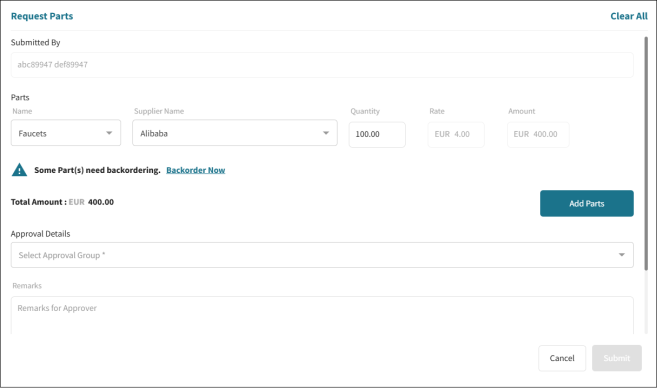
Fields on the Request Parts dialog box
| Field | Description | Notes |
|---|---|---|
|
Submitted By |
Name of the person submitted the request. | Read-only. |
|
Parts |
||
|
Parts Name |
Specific name of each part. | |
|
Supplier Name |
Name of the supplier providing the parts. |
|
|
Quantity |
Number of units requested. | |
|
Rate |
Cost per unit of the part. | |
|
Amount |
Total cost for the specified quantity of the part. | |
|
Total Amount |
Overall total for all parts requested. | |
|
|
Option to include additional parts in the request. | |
|
Approval Details |
Information regarding approval status. |
|
|
Remarks |
Any additional notes or comments. | |
|
Cancel |
Cancel the request. | |
|
Submit |
Submit the request. |